 Watashi Games
الاختبار: فصل واحد، أربعة برامج تلوين
معظم قوائم "أفضل برامج تلوين المانجا بالذكاء الاصطناعي" تصنف الأدوات بناءً على لوحة واحدة منتقاة بعناية. لكن هذه ليست الطريقة التي يقرأ بها أي شخص المانجا فعلياً. الفصل الحقيقي يتكون من عشرات الصفحات التي تظهر فيها نفس الشخصيات مراراً وتكراراً — وهذا هو بالضبط حيث تتماسك كل أداة أو تنهار.
لذلك قمنا بمعالجة نفس صفحات المانجا بالأبيض والأسود عبر الأدوات الأربع التي يلجأ إليها الناس أكثر: Google Gemini ("نانو بانانا"), أداة Colorize من NovelAI, Manga Colorizer (mangacolorizer.com — النتيجة الأولى الحالية في Google), وخط عملنا الخاص، Watashi Colorizer. نفس المدخلات، نفس المطالبة، لا توجد ميزة ضبط الألوان لأي طرف.
لم تكن النتائج متقاربة. أدناه هي المقارنة المباشرة — مع الصور الفعلية — لأربعة أمور تحدد ما إذا كان الفصل الملون قابلاً للاستخدام: اتساق الألوان عبر الصفحات، دقة الإخراج، وضوح النص والرسم، ودعم المحتوى.
Watashi مقابل Gemini مقابل NovelAI مقابل Manga Colorizer، في لمحة
كل ادعاء أدناه موضح بنتائج حقيقية لاحقاً في هذه المقالة — لا مجرد ترويج تسويقي.
- نفس ألوان الشخصيات عبر الفصل
- الإخراج يطابق حجم مدخلاتك بالضبط
- نص الكلام يبقى واضحاً ومقروءاً
- لا يعيد رسم / هلوسة فنك أبداً
- يتعامل مع مانجا المحتوى الحساس / الصريح
- مصمم للفصول الكاملة (دفعات)
1. اتساق الألوان: مدمر الفصول
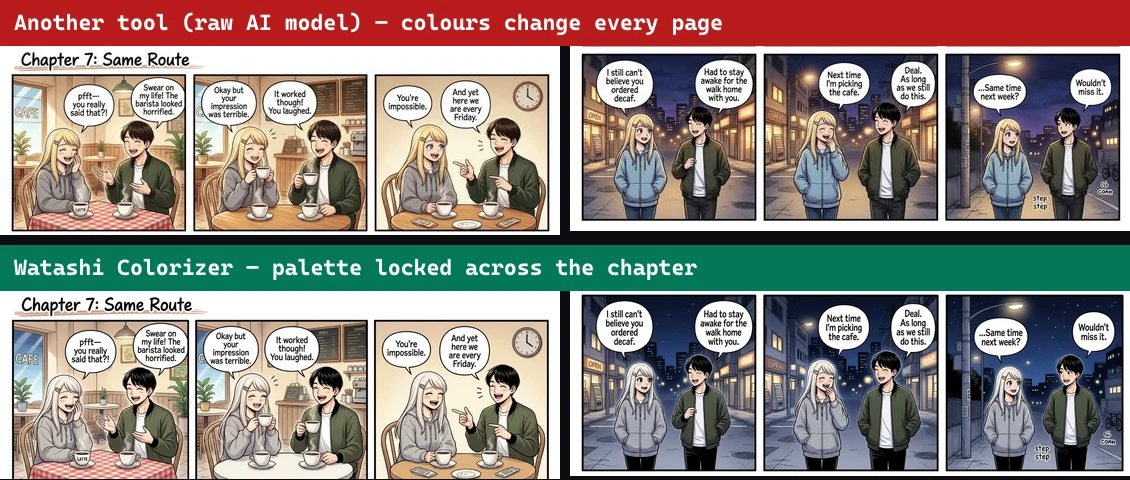
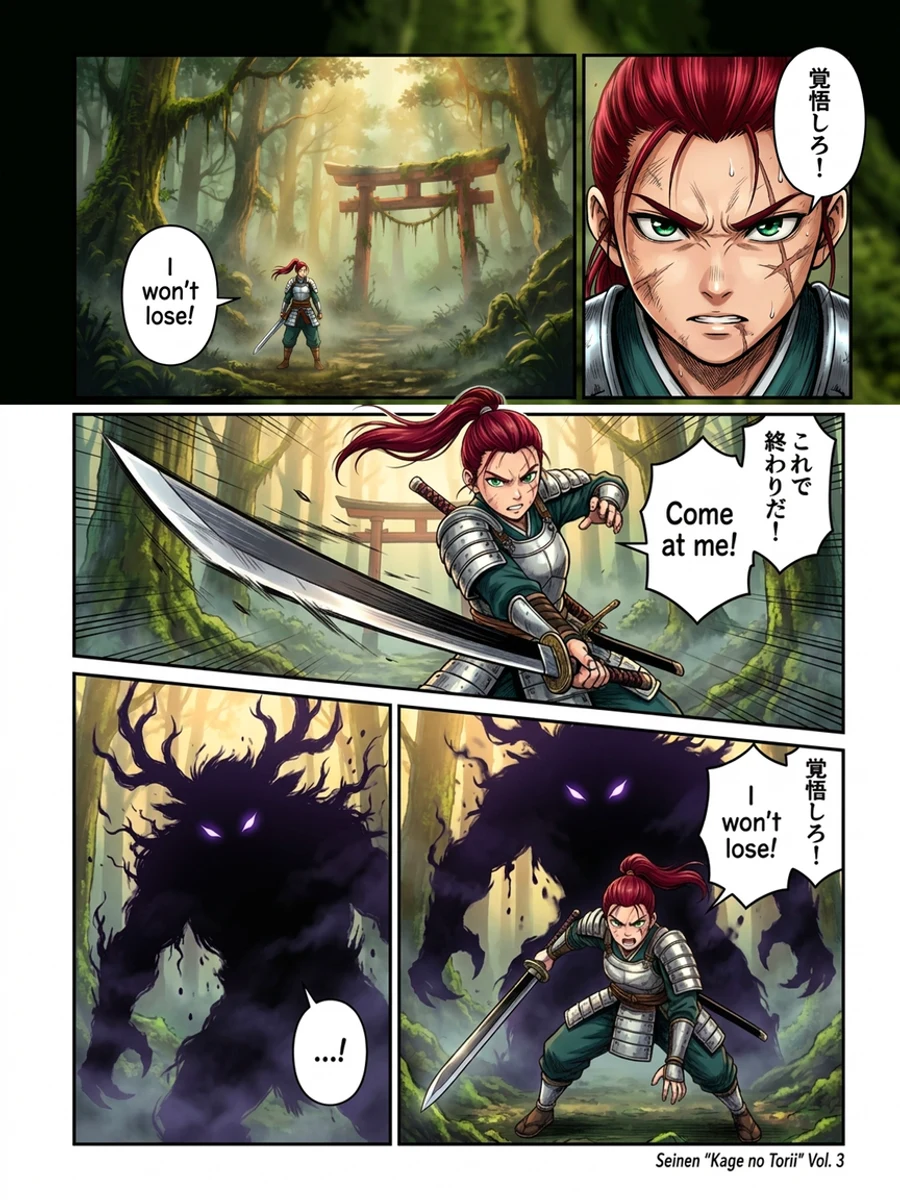
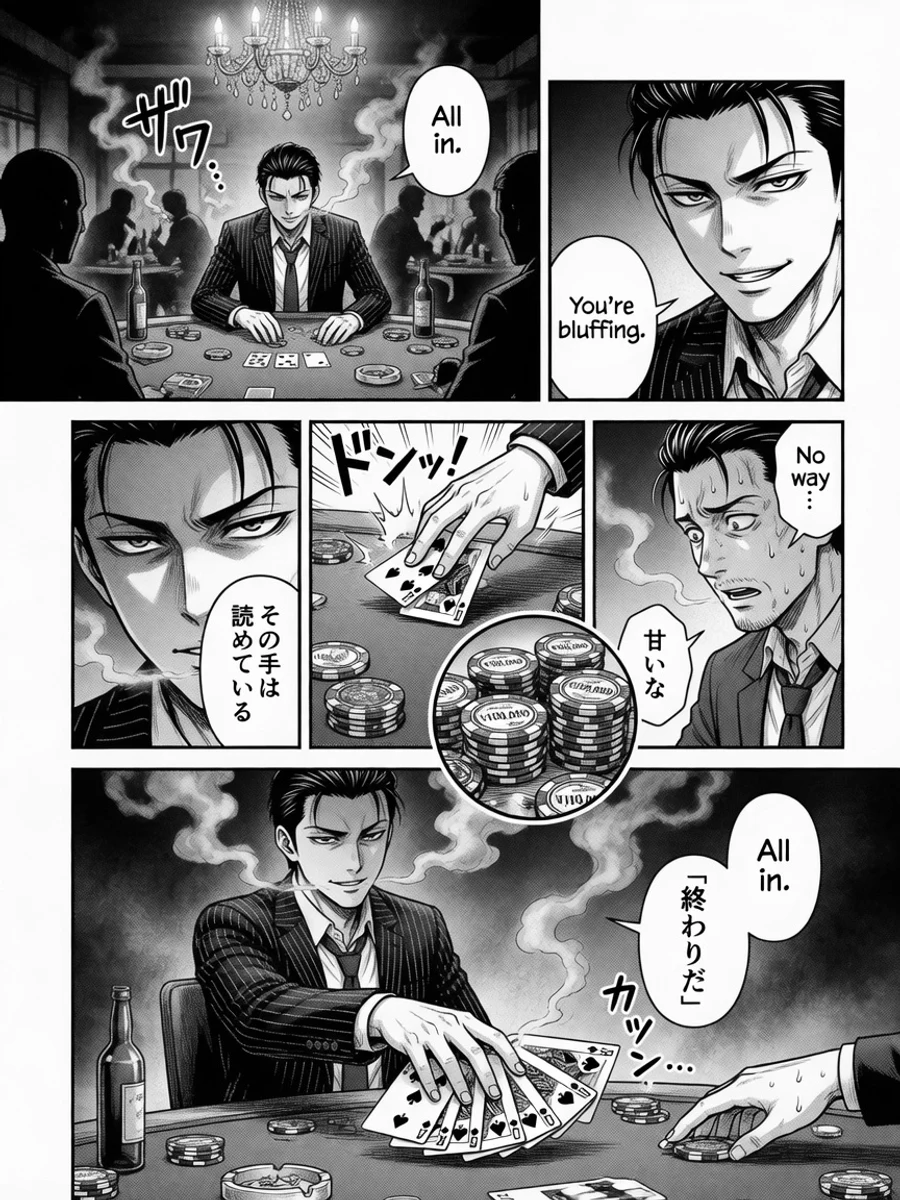
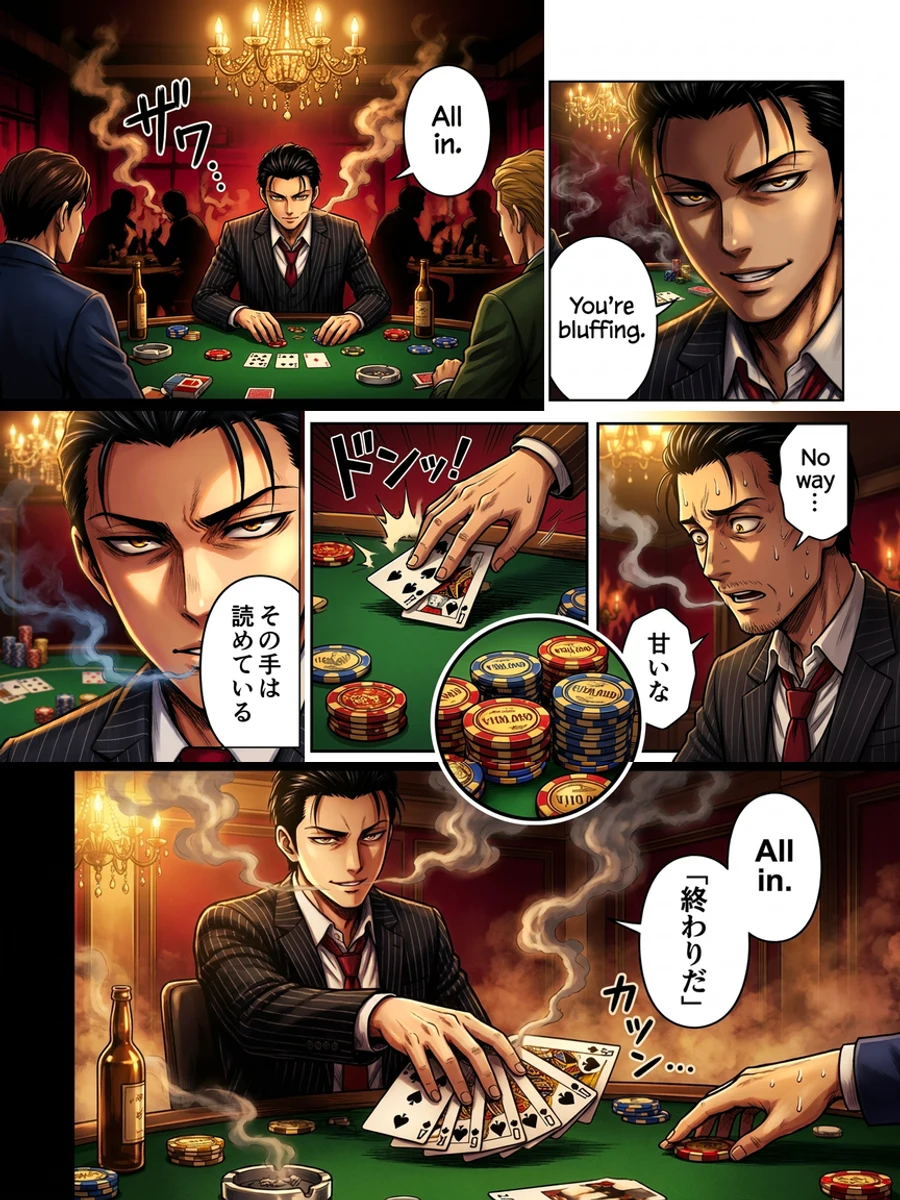
هنا هو الاختبار الأكثر أهمية، والذي تتجاهله كل التصنيفات. لقد أخذنا نفس الشخصيتين عبر صفحتين وقمنا بتلوين كل صفحة بشكل مستقل — وهذا بالضبط ما يحدث عندما تقوم بتغذية فصل إلى أداة تعمل على صورة واحدة في كل مرة.
النموذج الخام لا يملك ذاكرة للصفحة السابقة. لذا فهو يعيد تخمين كل لون من الصفر: سترة الفتاة ذات قلنسوة بلون واحد في الصفحة 1 ولون مختلف في الصفحة 2؛ الشعر يتغير، الأزياء تتغير، ويتحول بطلك بهدوء إلى شخص مختلف. Watashi Colorizer يثبت لوحة ألوان الشخصية ويحتفظ بها عبر كل صفحة — بحيث تتطابق الصفحة 1 مع الصفحة 500.
2. وضوح النص والرسم: لون، لا تعيد الرسم
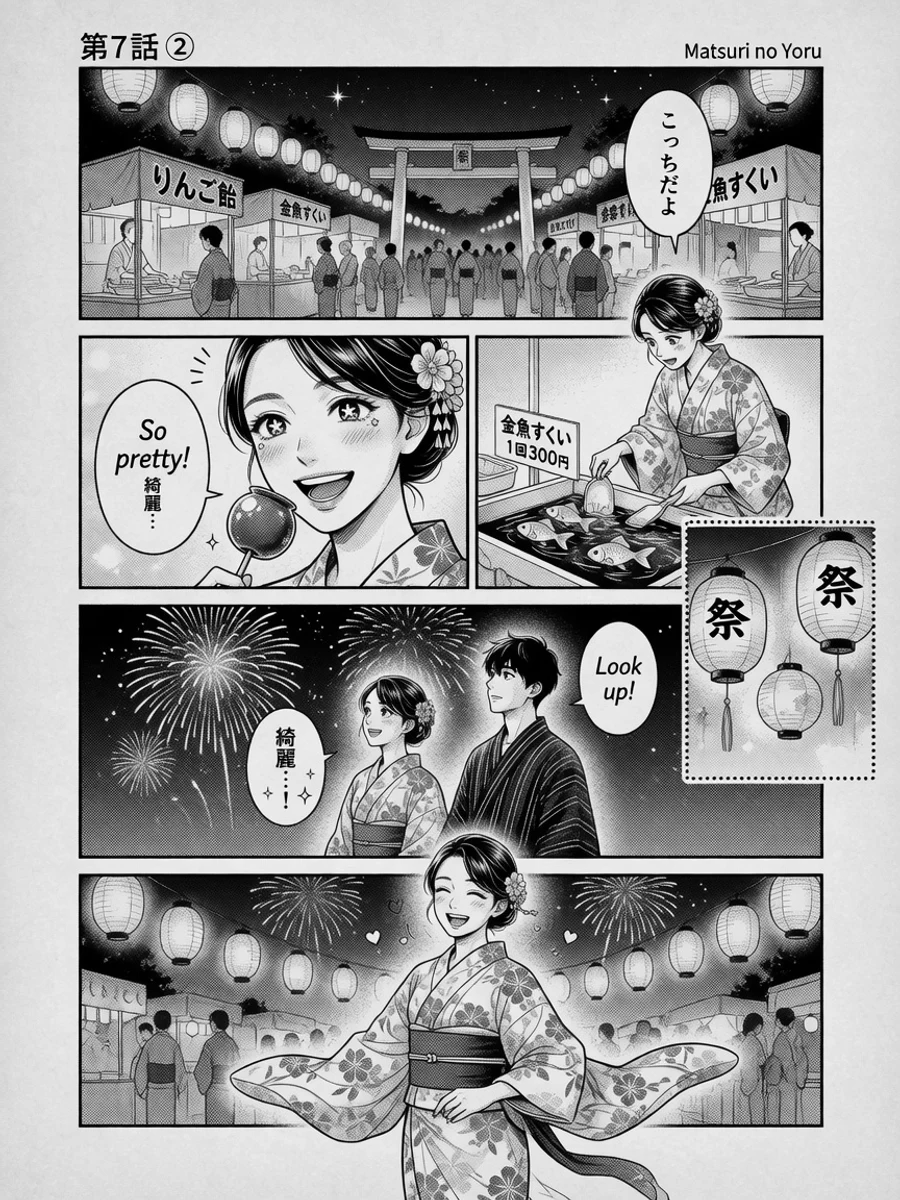
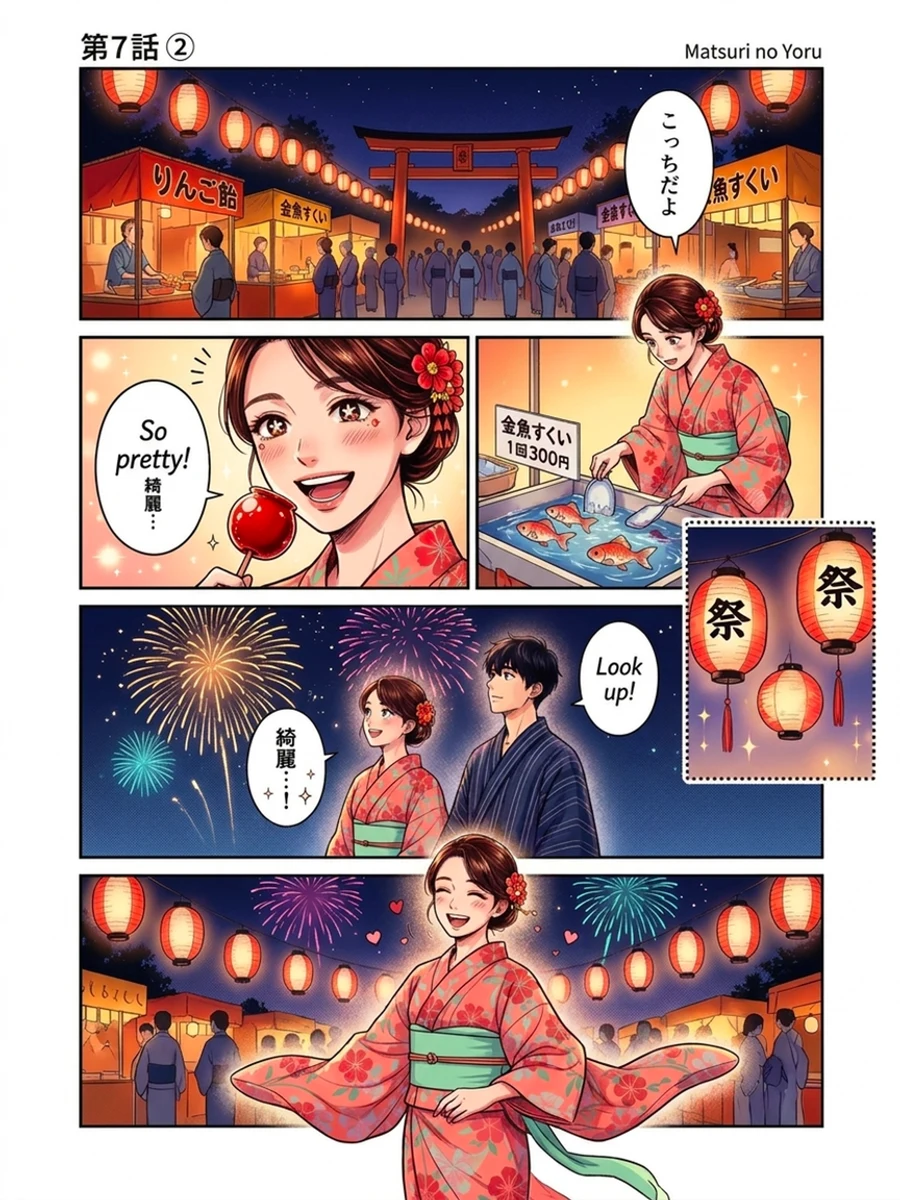
لملون الصور وظيفة واحدة فقط: إضافة اللون وعدم تغيير أي شيء آخر. نماذج الصور العامة لا تستطيع التحكم في نفسها — إنها تعيد الرسم. في اختباراتنا، شوش NovelAI نص فقاعات الكلام الإنجليزي وحوله إلى فوضى ذكاء اصطناعي غير قابلة للقراءة، وفي إحدى صفحات المهرجان استبدل امرأة تصطاد سمكة بطبق طعام — مخترعاً مشهداً جديداً لم يكن موجوداً في الرسم أبداً.
هذا يعد disqualified للمانجا. إذا أعادت الأداة كتابة ما يحدث في لوحة، فهي لا تلون قصتك — إنها تختلق قصة مختلفة. Watashi Colorizer يخفي ويحافظ على كل فقاعة كلام، خط، وفاصل لوحة، بحيث يبقى النص واضحاً ويبقى الرسم تماماً كما رسمه الفنان.
يحافظ Gemini على النص سليماً بشكل معقول في صفحة واحدة، لكنه لا يزال لا يملك طريقة لحماية النصوص الكثيفة أو الهوامش السوداء بالكامل على نطاق واسع — ويرث مشكلة الدقة المذكورة أدناه.
 أبيض وأسود
 ملوّن
ملوّن3. الدقة: صفحتك 900×1200 تعود 896×1195
هذه المشكلة غير مرئية حتى تقوم بتجميع فصل، ثم تصبح مزعجة. يعيد كل نموذج عام العرض إلى شبكته الخاصة. قم بتزويد Gemini بصفحة مانجا بحجم 900×1200 وسيعيد لك 896×1195 — بفارق بضعة بكسلات، في كل مرة. يقوم NovelAI بتخفيض حجم أي شيء يزيد عن ~1 ميجابكسل (حد مستواه)، لذا تفقد مسوحاتك عالية الدقة التفاصيل. نموذج صور OpenAI يخرج أحجاماً ثابتة تماماً.
يعيد Watashi Colorizer إخراجاً مطابقاً للبكسل بأبعاد مدخلاتك — 900×1200 إدخال، 900×1200 إخراج. تعود صفحاتك الملونة مباشرة إلى ملف CBZ الخاص بك، أو قارئك، أو ملفاتك الخام بدون أي إعادة قص. عبر فصل مكون من 200 صفحة، هذا هو الفرق بين إصدار مكتمل وعطلة نهاية أسبوع من الإصلاحات اليدوية.
 أبيض وأسود
 ملوّن
ملوّن4. المحتوى: نصف المانجا محظور في أماكن أخرى
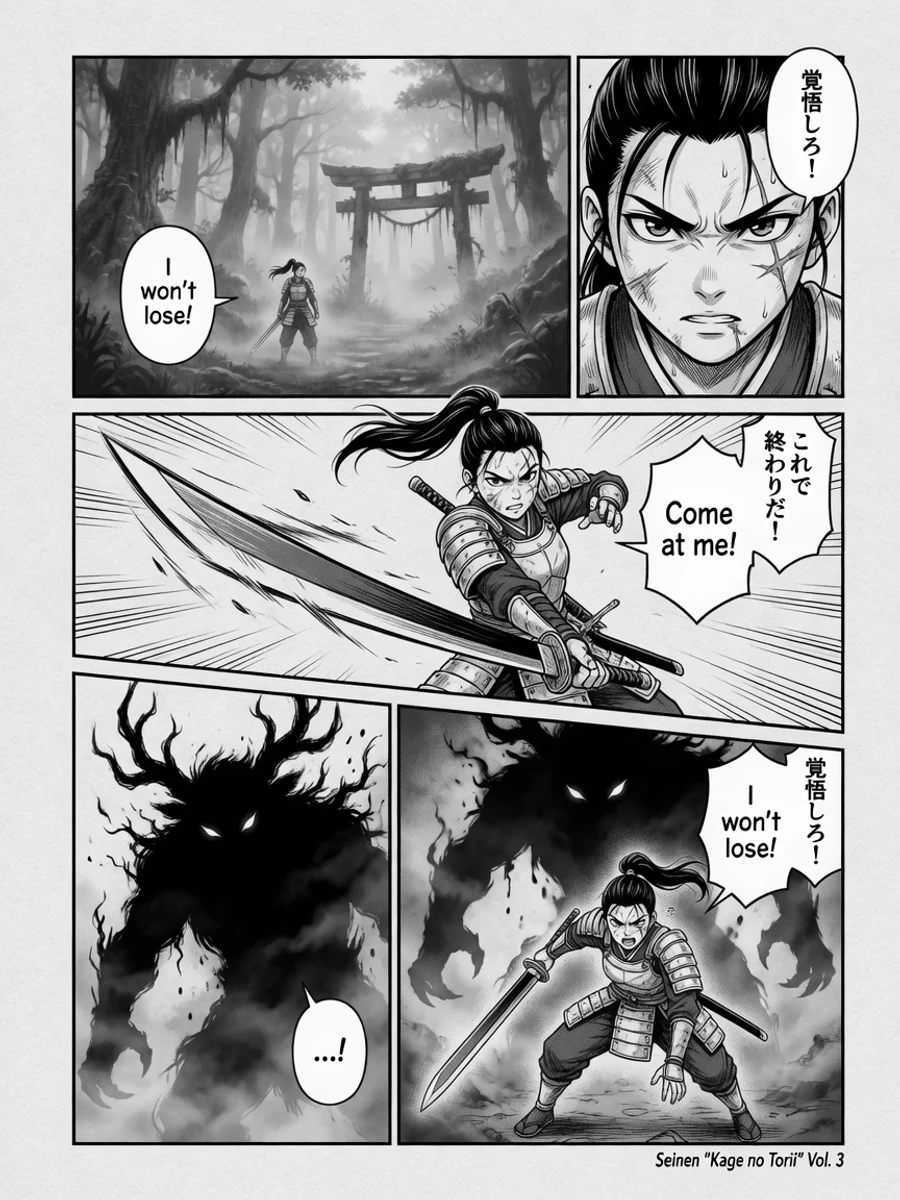
ليست كل المانجا مناسبة للجميع. فصول الشاطئ، مشاهد القتال، الرومانسية، والمحتوى الصريح غير الآمن هي شريحة ضخمة مما يرغب الناس في تلوينه بالفعل. يرفض Gemini و OpenAI المحتوى الصريح تماماً (حظر صارم لسلامة المحتوى)، ولا يملك Manga Colorizer خياراً للمحتوى غير الآمن على الإطلاق.
يشغل Watashi Colorizer نموذجاً غير خاضع للرقابة ومستضاف ذاتياً للمحتوى للكبار، لذلك يتم تلوين الفصل الصريح بوضوح مثل فصل شونين — مع الحفاظ على النص والرسم والاتساق. إنه نفس خط العمل، بغض النظر عن المحتوى.
 أبيض وأسود
 ملوّن
ملوّن5. الأداة المصنفة رقم 1 لم تنهِ العمل حتى
من الجدير بالذكر: النتيجة الأولى الحالية في Google لـ "manga colorizer"، موقع mangacolorizer.com، هي مجرد غلاف بسيط حول نموذج OpenAI واحد. في اختباراتنا، استغرقت ما يقرب من دقيقتين لصورة بسيطة واحدة، ولا تقدم دعماً للمحتوى غير الآمن، وفي صفحة حقيقية فشلت في إرجاع صورة قابلة للاستخدام على الإطلاق. الأداة الأكثر وضوحاً في الفئة هي الأقل موثوقية — وهذا هو بالضبط السبب في أن "الأكثر شعبية" و "الجيد حقاً" ليسا نفس الشيء هنا.
الخلاصة
Gemini و NovelAI نماذج قادرة — للوحة بطولية واحدة. لكن الفصل ليس لوحة. في اللحظة التي تحتاج فيها إلى أن تظل الألوان متسقة عبر الصفحات، وأن يبقى النص سليماً، وأن يُحفظ الرسم، وأن تتطابق الأبعاد، وأن يُسمح بالمحتوى للكبار، فإن الغلاف الذي يعمل على صورة واحدة في كل مرة ليس لديه إجابة. هذه ليست مشاكل في المطالبات؛ إنها مشاكل معمارية.
Watashi Colorizer هو خط عمل مخصص لتلوين المانجا، وليس مجرد غلاف: اتساق لوحة الألوان عبر فصل كامل، إخراج دقيق للبكسل، نص ورسم خطوط محفوظان، ودعم غير خاضع للرقابة — بحيث يبدو الفصل المكتمل وكأن فناناً واحداً لونه في جلسة واحدة. حمّل صفحة وشاهد الفرق على فنك الخاص.